
Cost estimate (BOQ)
Quantities by depth band for the pipes, trenches, manholes and road restoration of a circular-pipe network, priced from your state Schedule of Rates, with abstract, detailed estimate and measurement sheet in Excel and PDF.
Design > Cost Estimate (BOQ)... opens the Cost Estimate (BOQ) window. It measures the open project the way a sewerage DPR estimate does (excavation by depth band and soil class, shoring, bedding, pipes, manholes, backfill, disposal, road restoration, house connections, testing) and prices each item from a Schedule of Rates.
What it measures
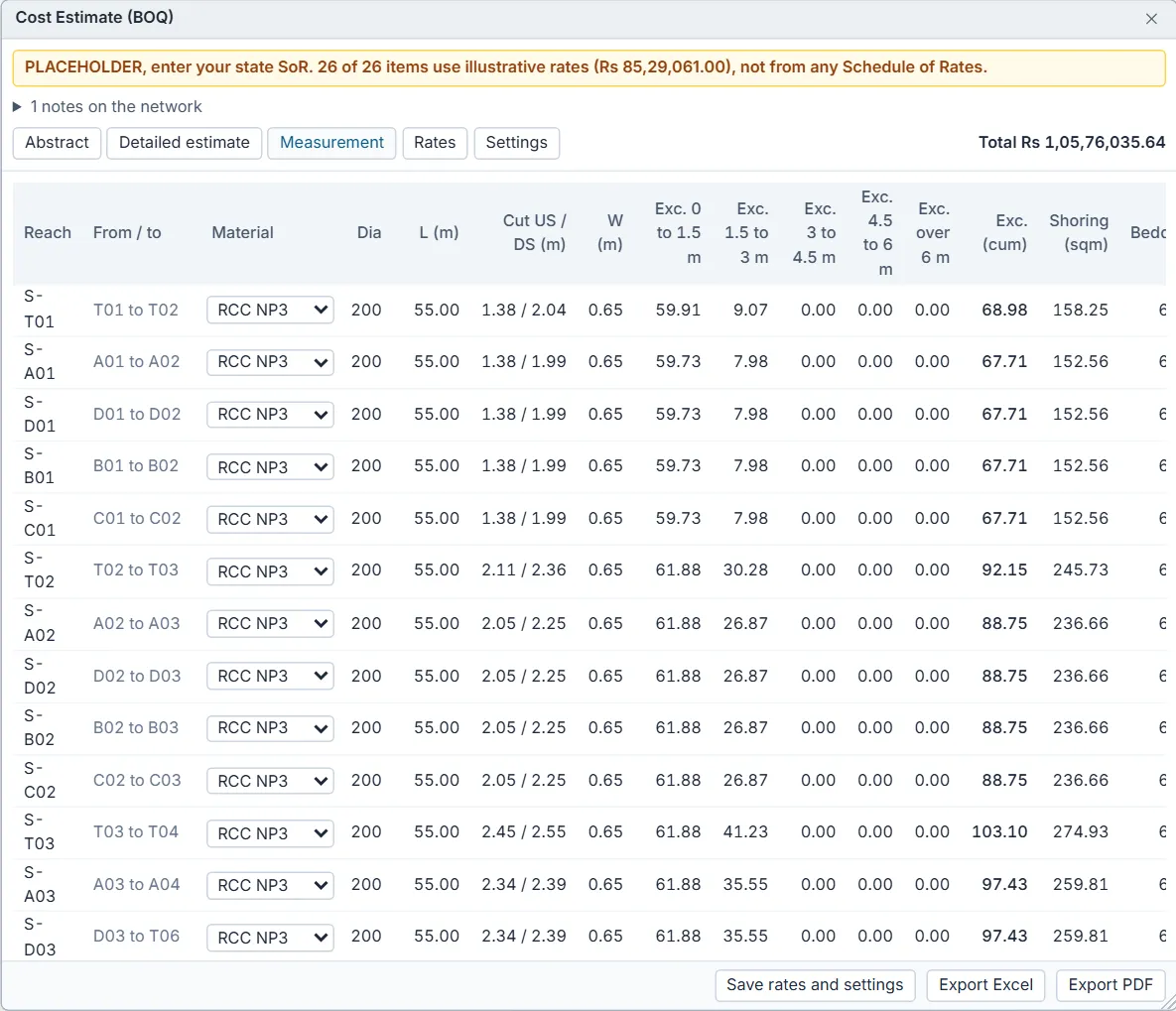
- Each circular conduit is a reach, from its two end manholes. The cut at each end is ground minus invert; ground is the manhole rim (invert plus maximum depth). An outfall has no rim in SWMM, so its cut is taken equal to the other end's, with a note.
- Every junction with a rim is a manhole, placed in a depth band by its depth.
- Trench width is the pipe's outside diameter plus a clearance on each side, but not less than the minimum width; more where the trench is shored.
- Excavation is split into depth bands and, within each band, into soil classes by the shares you set.
- The pipe material class is read from each conduit's Description or Tag when it names one (NP4, NP3 or RCC, DWC or HDPE, PVC, DI, SW or stoneware); otherwise it is RCC NP3.
The tabs
| Tab | What it shows |
|---|---|
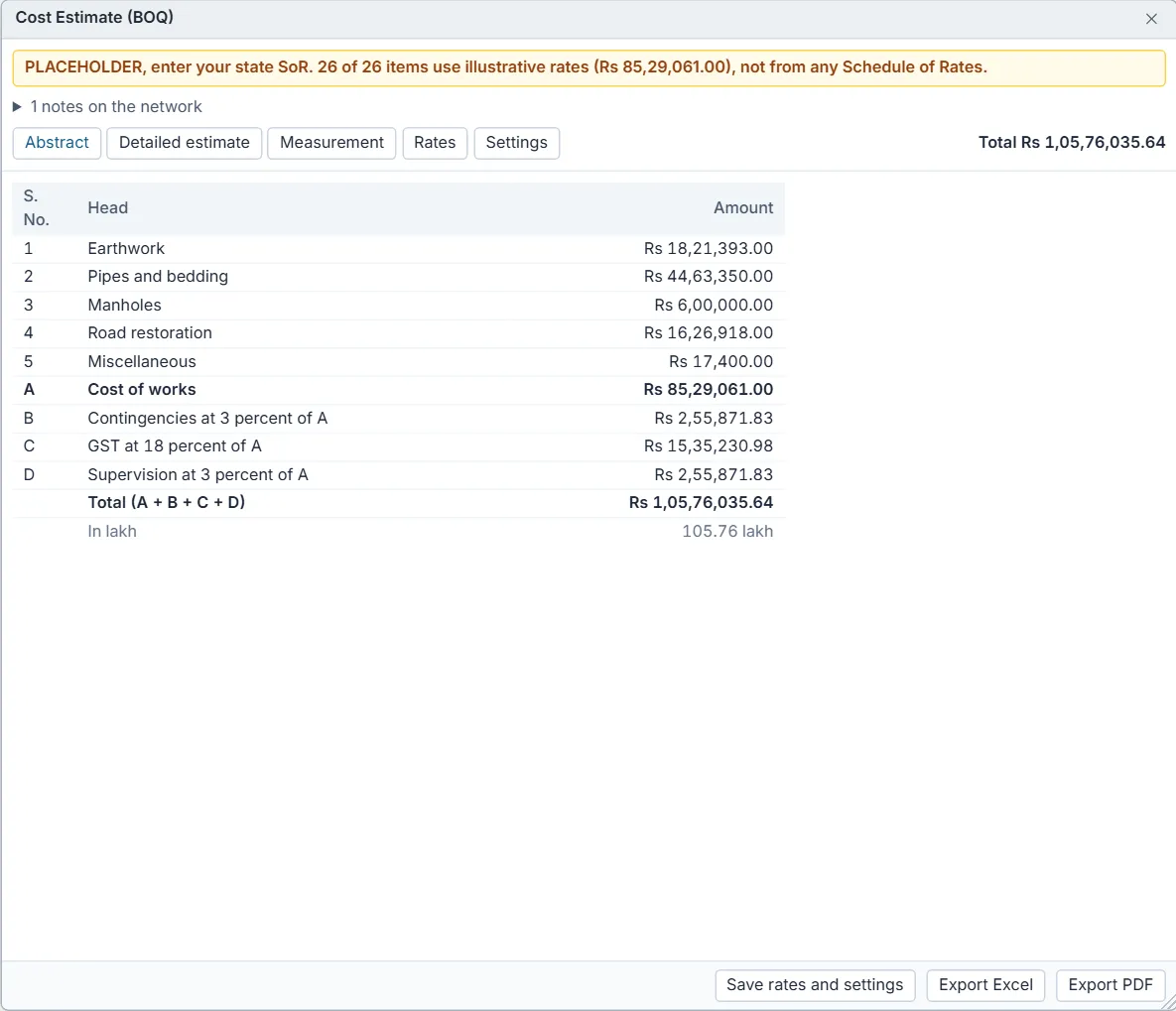
| Abstract | The abstract of cost by head (Earthwork, Pipes and bedding, Manholes, Road restoration, Miscellaneous), A the cost of works, B contingencies, C GST and D supervision as percentages of A, the total, and the total in lakh. The total is also shown at the top right on every tab. |
| Detailed estimate | Every item with its code, SoR reference, description, unit, quantity, rate and amount. A rate marked placeholder is illustrative; no rate in red means the item is left out of the total. |
| Measurement | The measurement sheet: per reach the material, diameter, length, cut at each end, trench width, excavation in each depth band and in total, shoring, bedding, backfill, disposal, road surface and house connections; and per manhole its depth, band, type and whether it is a drop manhole. |
| Rates | The Schedule of Rates the estimate uses, and the import of your state SoR. |
| Settings | Depth bands, soil classes, trench rules, bedding, manholes, road restoration and the percentages. |
Correct what the network cannot say
On the Measurement tab you can set, per reach, the pipe Material (RCC NP3, RCC NP4, DWC HDPE, DI, uPVC, Stoneware), the road Surface (Bituminous (BT), Cement concrete (CC), WBM, Unpaved, or by share to use the shares in Settings) and the number of House conn.; and per manhole the type (Brick masonry, RCC cast in situ, Precast RCC) and the Drop tick.
Enter your state Schedule of Rates
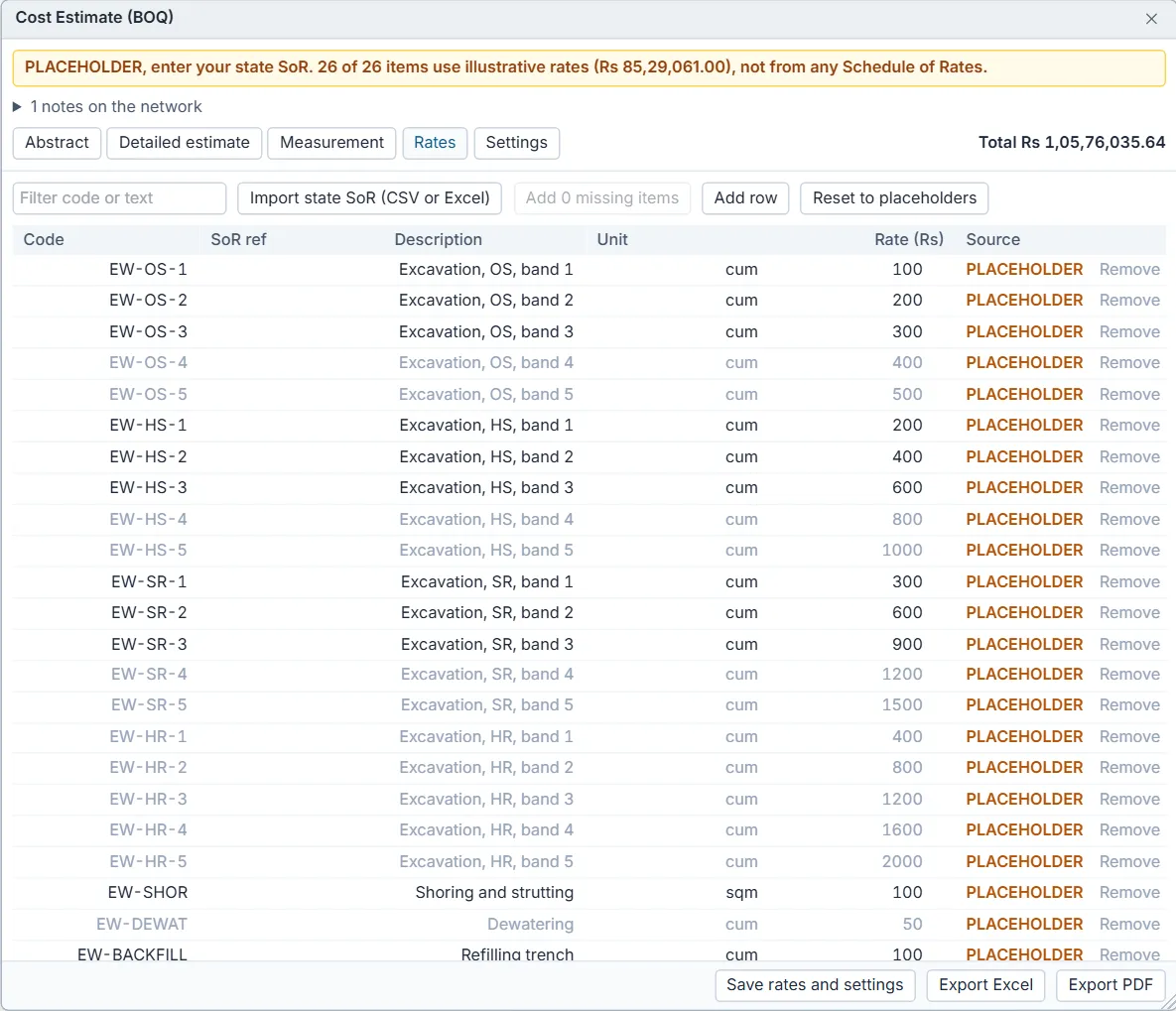
- Open the Rates tab and press Import state SoR (CSV or Excel). Pick the CSV or Excel file of your state's SoR.
- Check the Header row and which columns hold the Item number, Description, Unit and Rate. DrainPilot guesses them; the line under the choices shows how many rows will import and the first one.
- Press Import. The state items go into a library under their own item numbers. If the file's item numbers are DrainPilot's own codes, those items are priced at once.
- For each DrainPilot item, type or pick the state item number in its SoR ref box: the item takes that rate and is marked state SoR.
- Or type a rate straight into Rate (Rs); the item is then marked entered.
- Press Save rates and settings at the bottom to keep the rates and settings in this browser for your next estimate.
Add N missing items adds, at zero rate, the items this network needs that the rate list lacks. Reset to placeholders goes back to the illustrative rates. Rates are kept in this browser only; if the browser refuses storage, the window says the rates last only while the tab is open.
Settings and their defaults
| Setting | Default | Notes |
|---|---|---|
| Trench depth bands | 0 to 1.5 m, 1.5 to 3 m, 3 to 4.5 m, 4.5 to 6 m, over 6 m | Type the upper edges, for example 1.5, 3, 4.5, 6. |
| Charge excavation by | lift (each depth layer at its band) | Or the full depth of the section at one band. State SoRs differ; check your SoR's earthwork preamble. |
| Manhole depth bands | 0 to 1.5 m, 1.5 to 3 m, 3 to 4.5 m, 4.5 to 6 m, over 6 m | |
| Soil classes | Ordinary soil 70 %, hard soil 20 %, soft rock 10 %, hard rock 0 % | Applied to every band alike. Take them from the soil investigation; DrainPilot has no default for your site. They must add to 100. |
| Clearance each side of pipe | 0.2 m | From the CPHEEO water supply manual, as SM gives no figure. |
| Minimum trench width | 0.6 m | Common SoR practice, badged unverified. |
| Shore where cut deeper than | 1.5 m | Common practice, badged unverified. Shored trenches are made wider by the extra width. |
| Water table below ground | blank (no dewatering) | Set it to price dewatering below that depth. |
| Bedding thickness | 0.15 m | Concrete for RCC and stoneware, granular for DWC HDPE, uPVC and DI by default; badged unverified. |
| Default manhole type | Brick masonry | |
| Drop manhole above | 0.6 m | SM s.3.25 p.3-53. |
| Road restoration | By share of each reach: BT 60 %, CC 20 %, WBM 10 %, unpaved 10 % | Or lengths entered for the network. Cut back 0.3 m beyond the trench on both sides. A surface chosen per reach overrides the shares. |
| House connections, network total | blank (sum of reaches) | |
| Include hydraulic testing | Yes | |
| Contingencies, GST, supervision | 3 %, 18 %, 3 % of the cost of works | Placeholders: set them per your department and the current GST notification. |
Settings that would make the estimate wrong, such as bands out of order or soil shares that do not add to 100, are shown in red above the tabs.
Export
Export Excel writes four sheets: Abstract, Detailed Estimate (amounts and totals as formulas), Measurement and Rates. Export PDF writes the abstract of cost, the detailed estimate and the measurement sheets for trenches and manholes. Both are named after the project, for example indian-sewer-zone estimate.xlsx.